
Vector Feature Extraction from Topographic Maps
LAND INFO extracts vector features from topographic maps, satellite imagery, and aerial photography. Topo maps are an ideal base for large-area coverage, and can optionally be updated with detailed coverage extracted from aerial or satellite imagery of select areas. Because topographic maps often include ground truthing they may supply detail above and beyond satellite imagery, as an example cultivated areas can clearly be distinguished in satellite imagery but topographic maps may show the specific crop being grown (on the other hand the satellite imagery is much more current than the topo map.)
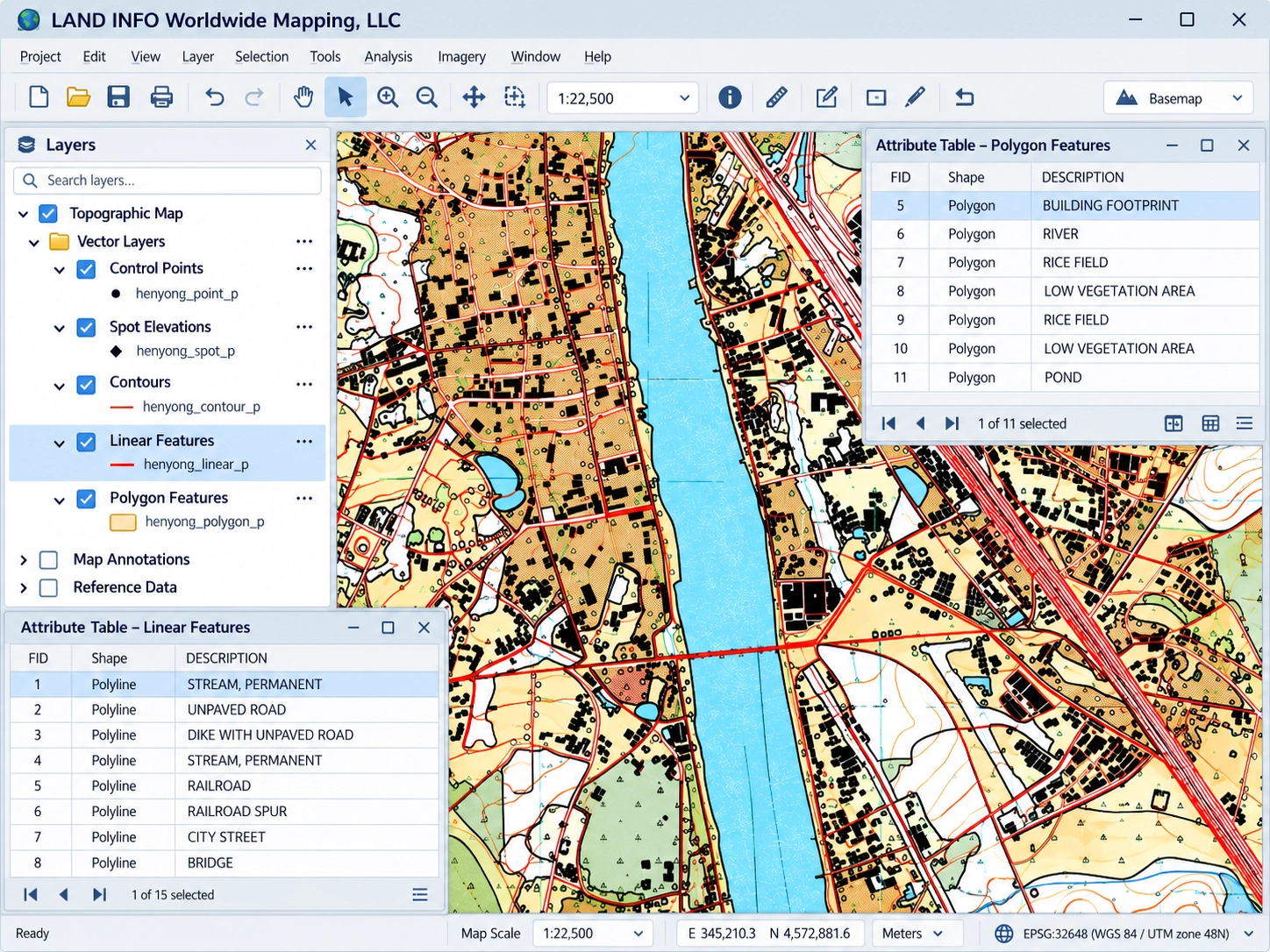
Available layers, depending on map scale/publisher, include:
POLYGON
- Airport
- AshDisposal
- Building Church
- Building Major
- Building School
- Cemetery
- City Incorporated
- CultivatedArea
- Forest
- Hydro Island
- Hydro Lake
- Hydro Marsh-Swamp
- Hydro Ocean
- Hydro River
- MineCut WaterFilled
- Orchard
- Park
- Quarry
- SlurryPond
- SportsField
- StripMine
- SwimmingPool
- UrbanArea BuiltUp
- UrbanArea Core
- Vineyard
- Woodland
- Woodland Marsh Swamp
POINT
- BenchMark
- Building Church
- Building Minor
- Pole Power
- Pole Telephone
- River Mileage Marker
- Spot Height
- Spring
- Tank Water
- Tower HighVoltage
- Tower Other
- Tower Radio
LINEAR
- Bathymetry
- Boundary Administrative
- Boundary Country
- Boundary Other
- Bridge
- Contours Index
- Contours Intermediate
- Dam
- FenceLine
- Highway Primary
- Highay Secondary
- Hydro IntermittentStream
- Hydro PerennialStream
- Pipeline
- PowerTransmissionLine
- Railroad Primary
- Railroad Spur
- Road 4WD
- Road LightDuty
- Road Secondary
- Road Tertiary
- SectionLines
- Telephone
- Trail
- Base Mapping
- Military Applications
- Telecommunication Modeling
- Simulation & Training – Military, Aviation, Urban Planning
- Cartography & Map Publishing
- Accuracy and Quality – Extensive quality control
- Extensive Geographic Coverage – Utilizing our worldwide Topographic Map Archive
- Quick Turn-around Times – we will help you meet your deadlines
- Affordable – You’ll be surprised how much money LAND INFO will save you, not to mention the headaches of data conversion
- Custom recommendation for your specific project area/type
Vector Generation
LAND INFO uses both automatic and manual methods of extraction. The automatic method uses pixel value interpretation software to trace a vector line over continuous pixels of certain color values. The manual method consists of heads-up/on-screen digitizing over a DRG (Digital Raster Graphic – geo-referenced color scan of a topographic map or nautical chart)
Once the vector features are extracted to line files, they can be attributed to your project specifications. This includes having a separate vector file for every vector feature or combining many vector features into one vector file with appropriate attribution. Specific attribution, such as codes and numeric representation, can be added to the vector files attribution table to easily ingest the data into specific applications.
File Format
- Esri .shp shapefile or .mdb GeoDatabase
- AutoCAD .dwg or .dxf
- MapInfo MIF/MID/TAB
- Microstation .dgn
(Note: If your desired output is not listed above we can easily convert to proprietary formats.)
Delivery Options
LAND INFO provides several different delivery options:
- FTP
- CD-ROM
- DVD-ROM
- USB flash drive
- External hard drive (USB 2.0/USB 3.0/FireWire 400/FireWire 800/eSata)
Quality Control
Vector Feature Extraction has several areas that need to be checked to assure a quality GIS Data product. This includes accurate digitization from the source material, built topology, and attribution accuracy.
- The source material is used as a benchmark to ensure that all derived data is accurately captured.
- All vector files are overlaid on top of their source material and visually inspected by trained technicians to assure that all features are captured accurately.
- The attributes are verified against the source data and against any client data that is provided to ensure its smooth incorporation into client applications.
Map Scales
Scales for the Vector Feature extraction will replicate the scale of the map for which the features were derived.
Vector Feature Extraction from Satellite Imagery
LAND INFO also offers Vector Feature Extraction from Satellite Imagery.